
Claude Code
Without The Pain
Of The 
Download and try the app for free
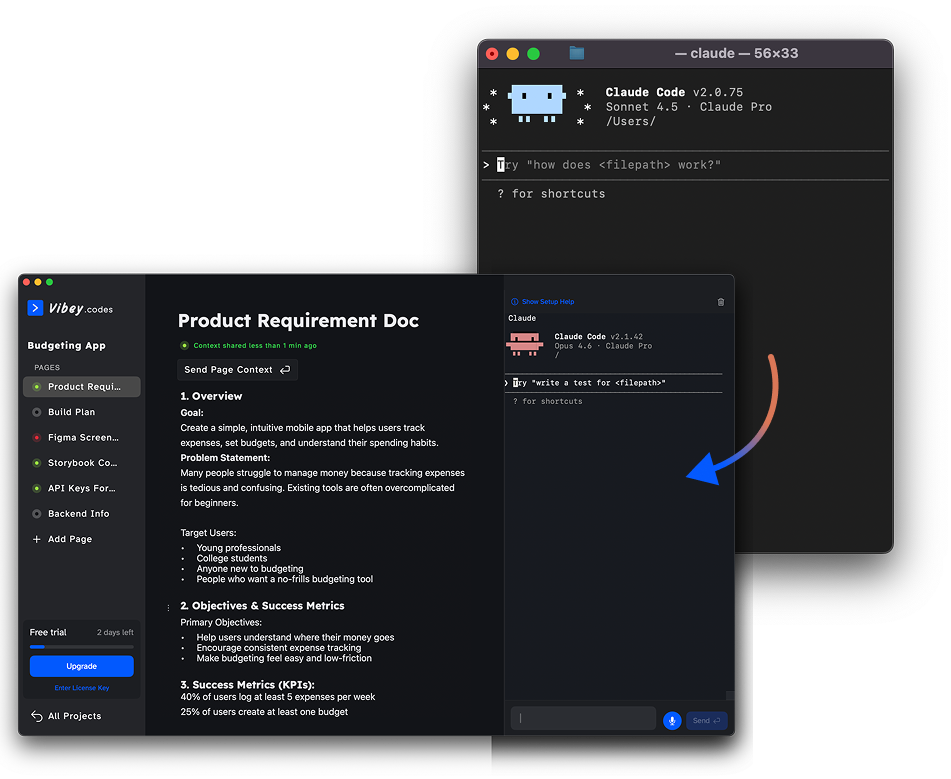
Vibey – Ship faster with Claude Code
Plan prompts, draft PRDs, and run Claude Code in one place.
View on Product HuntAs a designer, Claude Code massively expanded what I can build but I found the terminal painful. When Claude is running or I hit usage limits, I can't easily plan future prompts or features without bouncing between markdown files, Google Docs, and Notion.
So I built Vibey: a simple Mac app with:
- A built in terminal for Claude Code
- Pages to draft prompts, PRDs, and feature plans
- One click send to Claude
- Plan while Claude runs. Ship faster without context switching.
Free to try. No subscription!
About Me

Will Fuller
Founder Designer & Vibe Coder
I built Vibey to move faster on my side projects.
Claude Code massively expanded what I can build as a designer but working in a terminal never felt natural to me. Editing long prompts is painful. There's no spellcheck. No proper dictation.
So I built Vibey!
Vibey brings everything I need into one place.
Plans, PRDs, notes, feature backlogs and draft prompts all together, ready to send to Claude Code with a single click.
Before Vibey, my workflow was scattered across Coda, Google Docs, markdown files, and Figma links, constantly copying, pasting, and jumping from window to window. Now I can plan, write, and prompt without fighting the terminal.
Why Am I Building Vibey
Terrible text editing in terminals
Editing long prompts in a terminal is slow and frustrating. Deleting, rewriting, and navigating text feels clumsy compared to the WYSIWYG editors I'm used to. Terminals simply aren't built for writing.
No spellcheck in the terminal
I'm dyslexic, and spelling gets worse when I'm typing long prompts fast. I often realise too late that my prompt barely makes sense. Claude usually figures it out but I'd rather send clear, accurate prompts in the first place.
Claude context uncertainty
I'm often unsure what I've shared with Claude and when. Is it following the PRD, or just making it up as it goes along? In Vibey, any page can be shared with a clear date and time stamp and if you terminate the session or run /clear, the status turns red as a warning.
Prompt drafting feels rushed and error-prone
I often start drafting my next prompt while Claude is still working. If something changes, there's no easy way to clear or rewrite text. Vibey lets you draft prompts properly, then send them with one click when both you and Claude are ready.
Speech to text is unreliable
On macOS, double-tap Control dictation helps, but it's pretty ropey. It often gets words wrong, which isn't great when you're dictating long prompts. Vibey is designed to support better, more reliable dictation built specifically for writing prompts.
Mental overhead tracking usage limits
While it's not possible to track usage limits in real time reliably, Vibey keeps the latest usage limit messages pinned in the terminal. This makes it easier to stay aware of your usage without breaking focus.
Eye strain from terminal contrast
High contrast terminals with pure black backgrounds and bright white text make eye strain worse. There are far more readable typefaces out there, like Atkinson Hyperlegible, but terminals don't prioritise this.
Fragmented workflow
Claude works best with clear designs and detailed context. Before Vibey, my workflow was scattered across Coda, Google Docs, markdown files, and Figma links — constantly copying, pasting, and jumping between windows.
Pricing
One-time purchase. Lifetime access. All future updates included. To thank our first users, use code EARLYADOPTER20 at checkout for 20% off.
Lifetime Access
Pay once, use forever.
$39.99$49.99

Support us on Product Hunt
Leave a review